plantuml 
A LuaLaTeX and pdfLaTeX package for PlantUML in LaTeX
PlantUML is a program which transforms text into UML diagrams. This package allows for embedding PlantUML diagrams using the PlantUML source.
It works with both lualatex and pdflatex.
Both engines need -shell-escape so that the package can call PlantUML.
See docs/decisions/0001-support-pdflatex-via-shell-escape.md
for why pdfLaTeX is driven directly via shell escape (issue #1).
Preconditions
- Environment variable
PLANTUML_JARset to the location ofplantuml.jar. You get it from https://sourceforge.net/projects/plantuml/files/plantuml.jar/download. Not needed when renderingpng/svgthrough a PlantUML server (see Rendering via a PlantUML server). If neither a jar nor a server is available, the diagram is replaced by a visible placeholder rather than aborting the build. - Windows: Environment variable
GRAPHVIZ_DOTset to the location ofdot.exe. Example:C:\Program Files (x86)\Graphviz2.38\bin\dot.exe. You can install graphviz usingchoco install graphviz. - lualatex or pdflatex available, called with the command line parameter
-shell-escape. - In case you want to have the images as PDFs (and not using TikZ or PNG), ensure that
inkscape.exeandpdfcropare in your path. You can get inkscape usingchoco install inkscape.pdfcropshould be part of your latex distribution.
Examples
Minimal Example
LaTeX source:
\documentclass{scrartcl}
\usepackage{plantuml}
\begin{document}
\begin{plantuml}
!theme cerulean-outline
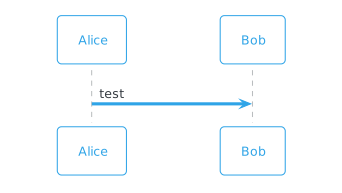
Alice -> Bob: test
\end{plantuml}
\end{document}
The !theme line is optional; it picks a PlantUML colour theme (the examples use
cerulean-outline for a cleaner
look than the colourful default). @startuml and @enduml are optional: when the diagram body omits them,
PlantUML adds them automatically (issue #4),
so the examples here leave them out. You may still write them explicitly if you
prefer.
Compilation: lualatex -shell-escape example-minimal (or pdflatex -shell-escape example-minimal)
Result:
Rendering from a File
Use \plantumlinput{<file>} to render a diagram stored in an external PlantUML
source file, analogous to minted’s
\inputminted and listings’ \lstinputlisting
(issue #3):
\documentclass{scrartcl}
\usepackage{plantuml}
\begin{document}
\plantumlinput{example-input-file.puml}
\end{document}
It honors the output mode and reuses the same caching, server, and
-output-directory handling as the plantuml environment. The file is read
relative to the current working directory, so paths in subdirectories (e.g.
\plantumlinput{diagrams/foo.puml}) work when compiling from the project root.
See example-input-file.tex.
Example Class Relations Rendered Using SVG
LaTeX source:
\documentclass{scrartcl}
\usepackage{graphics}
\usepackage{epstopdf}
\epstopdfDeclareGraphicsRule{.svg}{pdf}{.pdf}{
  inkscape "#1" --export-text-to-path --export-filename="\OutputFile"
}
\usepackage[output=svg]{plantuml}
\begin{document}
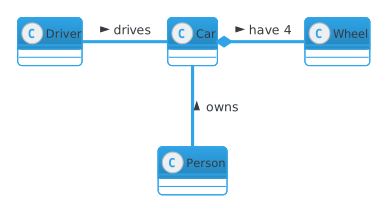
\begin{plantuml}
!theme cerulean-outline
class Car

Driver - Car : drives >
Car *- Wheel : have 4 >
Car -- Person : < owns
\end{plantuml}
\end{document}
For older Inkscape use this LaTeX source:
\documentclass{scrartcl}
\usepackage{graphics}
\usepackage{epstopdf}
\epstopdfDeclareGraphicsRule{.svg}{pdf}{.pdf}{
  inkscape -z --file=#1 --export-pdf=\OutputFile
}
\usepackage[output=svg]{plantuml}
\begin{document}
\begin{plantuml}
!theme cerulean-outline
class Car

Driver - Car : drives >
Car *- Wheel : have 4 >
Car -- Person : < owns
\end{plantuml}
\end{document}
Compilation: lualatex -shell-escape example-class-relations (or pdflatex -shell-escape example-class-relations)
Result:
Rendering via a PlantUML server
Instead of a local plantuml.jar, png and svg diagrams can be rendered by a
PlantUML server over HTTP. This
needs only curl — no Java and no local PlantUML installation — which is handy
on CI and shared build machines (see issue #6).
Point the package at a server with the server option:
\usepackage[output=svg, server=https://www.plantuml.com/plantuml]{plantuml}
Alternatively set the PLANTUML_SERVER environment variable (the package option
takes precedence over it):
export PLANTUML_SERVER=https://www.plantuml.com/plantuml
You can run your own server, for example with Docker:
docker run -d -p 8080:8080 plantuml/plantuml-server:jetty
# then use server=http://localhost:8080
Notes:
- Only
output=pngandoutput=svguse the server.output=latex(TikZ, the default) cannot be produced by a server and always uses the localplantuml.jar, so keepPLANTUML_JARset if you need latex output. - See
example-server--png.texandexample-server--svg.texfor complete examples. - The diagram source is sent hex-encoded in the request URL, so a very large diagram may hit the server’s URL-length limit.
Caching
Generated diagrams are cached by a hash of their source, similar to
minted and
memoize. Each diagram is written to
plantuml-<hash>-converted-to.<ext>, and PlantUML (or the server) is invoked
only when no file for that hash exists yet. Unchanged diagrams — as well as
repeated or reordered ones — reuse the cached output, so recompiles are fast and
only edited diagrams are regenerated. The -converted-to suffix means the
standard TeX .gitignore
already ignores these files (via *-converted-to.*), so no extra entry is
needed. Delete the plantuml-*-converted-to.* files to clear the cache.
Global Preamble
The default PlantUML style is colorful, which is not ideal for printouts. Instead
of repeating skinparam settings in every diagram, set a global preamble once
that is applied to all diagrams (issue #5).
Write it inline with the plantumlpreamble environment:
\begin{plantumlpreamble}
skinparam monochrome true
skinparam backgroundColor white
skinparam defaultFontName sans-serif
\end{plantumlpreamble}
…or keep it in a file and point at it with \plantumlpreamblefile{<file>}. Either
form affects every diagram that follows (set it once near the top of the
document). The preamble is folded into the diagram cache key, so changing it
regenerates the diagrams. See example-preamble.tex.
The local jar applies the preamble to every diagram via PlantUML’s -config. The
PlantUML server has no such option, so there the preamble is prepended to the
source instead; this styles the usual marker-less diagrams, but a server diagram
that spells out its own @startuml/@enduml keeps the default style (render it
through the local jar if you need the preamble applied).
Captions and Labels
Diagrams can carry a numbered, \ref-able caption (issue #8).
The options are:
caption={...}— the caption text,label={...}— a\labelfor cross-references,float— place the diagram in a floatingfigure(optional placement, e.g.float=htbp;float=Hneeds thefloatpackage). Withoutfloatthe diagram and its caption are typeset in place (no floating), like listings’caption=— which avoids the erratic placement of a barefigure.
\plantumlinput takes these as an optional argument:
\plantumlinput[caption={A diagram from a file.}, label={fig:demo}]{diagram.puml}
The plantuml environment can’t take an optional argument (a verbatim
environment without a mandatory argument can’t carry one), so set the options for
the next environment with \plantumlset, in the spirit of \lstset:
\plantumlset{caption={A sequence diagram.}, label={fig:seq}}
\begin{plantuml}
Alice -> Bob: hi
\end{plantuml}
See example-caption.tex.
Diagram Font (latex/TikZ output)
With the default output=latex (TikZ), PlantUML computes each box’s size using a
sans-serif font, then emits TikZ that your document typesets. If that text is
set in the document’s default (serif) font, it doesn’t fit the boxes and the
margins look uneven (issue #14).
The package therefore renders the diagram text with \PlantUmlTikzFont, which
defaults to \sffamily so the text matches the boxes. Change it if needed:
\renewcommand\PlantUmlTikzFont{\rmfamily}  % serif, e.g. to match a serif skinparam
\renewcommand\PlantUmlTikzFont{}           % use the surrounding document font
png/svg output is unaffected (PlantUML renders the text itself), so it is the
simplest choice when exact text fit matters. See example-mindmap.tex.
Beamer
The package works in beamer (issue #11).
The only requirement is that any frame containing a plantuml environment is
declared [fragile], because the environment captures its body verbatim:
\documentclass{beamer}
\usetheme{moloch}
\usepackage{plantuml}
\begin{document}
\begin{frame}[fragile]{PlantUML in Beamer}
\begin{plantuml}
Alice -> Bob: Authentication Request
Bob --> Alice: Authentication Response
\end{plantuml}
\end{frame}
\end{document}
Without [fragile] you get errors such as Paragraph ended before
\beamer@doframe was complete. See example-beamer.tex.
Installation
Your latex distribution should take care.
For manual installation, copy plantuml.* to your local texmf folder in the sub directory tex/latex/plantuml.
See the discussion at tex.sx for the concrete location of the folder on your system.
Development
The release is built using GitHub Actions (workflow file) using release.sh.
Release preparation:
- Adapt copyright year (line 1)
- Adapt as date and version number (line 6) in
plantuml.sty. - Adapt
CHANGELOG.md. - Set a git tag and push.
Alternative Solutions
TikZ-UML is a very powerful package based on TikZ. More alternative solutions are collected at the CTAN topic UML.
License
SPDX-License-Identifier: LPPL-1.3c+